Privacy & security assessments people don’t hate

Turn “Can we use this?” into a practical way forward.

Caijo guides your team through assessments in a familiar chat UI, asking for the context people would not know to include. They get an initial assessment with identified risks, practical next steps and connected documentation. No legal expertise or carefully crafted prompts required.

Every project starts with a question.

01 See it in action

A familiar chat UI. A questionnaire that fits your use case.

Caijo combines a familiar, ChatGPT-style conversation with a process built for privacy and security assessments. It asks for the details your team might not think to include in a form. Anyone in your organisation can get started 24/7 without waiting for a privacy meeting.

Caijo AI notes in customer meetings
Caijo

Hello. I’m here to work through an assessment with you. I’ll ask for the context it needs, so you don’t have to know what to include in advance.

What would you like to assess?

Team member

Can we use an AI assistant to take notes in customer meetings?

Caijo

Let’s assess how you would use it, rather than the tool in isolation.

I suggest we cover what it records, where the recordings and notes go, who can access them, and how long they remain available. We can refine that scope as we go.

To start, do you need to keep the recordings, or only the notes? And would the notes stay in the assistant, or be copied into another system?

Team member

We only need a summary and action points. The assistant records audio and creates a transcript too. We’d copy the notes into our CRM, where the whole sales team can currently read those customer records.

Caijo

That brings the CRM into scope as well. We now have several outputs to consider: the audio, the transcript and the notes copied into customer records.

You’ve also identified a difference between what you need and what the default setup produces. We should check whether keeping the audio and transcript is necessary, and whether everyone with CRM access needs the meeting notes.

Have you used it with customers yet? What do you know about the retention settings in the assistant and the CRM?

Team member

We’ve only tested it in an internal meeting, not with customers. The workspace default keeps audio and transcripts, but I haven’t checked for how long. CRM notes don’t currently have a deletion schedule.

Caijo

I’ll record that customer use has not started and that the retention periods are unconfirmed, not assume that the defaults meet your needs.

Two things need attention: retaining detailed recordings when you only need notes, and having no agreed deletion schedule for those notes in the CRM. Neither is resolved simply by choosing a meeting assistant.

Next, what would customers be told about the recording? Have you checked whether the provider uses meeting content for its own purposes, and who can open the recordings or notes?

Team member

The bot is visible, but we haven’t agreed what to tell customers or checked the provider’s own uses. Recording links are restricted to our workspace. We can limit CRM notes to the account team, but we haven’t changed that setting yet.

Caijo

I’ll distinguish what is in place from what is only possible. Workspace-restricted links are a reported safeguard. Limiting CRM access is an available option, not an implemented measure.

A visible bot alone does not tell us what customers will understand about the recording and subsequent uses. The provider arrangements and customer explanation therefore remain open points for review.

For the proposed setup, I recommend restricting notes to the people who need them and checking whether audio and transcripts can be deleted after use. Will someone also review the AI-generated summary before it becomes part of the customer record?

Team member

The meeting owner will review the summary before it is copied. We plan to restrict the notes to the account team and delete audio and transcripts after checking the summary, if the settings allow it.

Caijo

That gives us a proposed setup, which I’ll record as planned, not implemented or tested.

The next steps are to confirm and test the deletion settings, apply the CRM access restriction, and make the meeting owner’s review part of the workflow. That review matters because an inaccurate summary could otherwise become part of the customer record.

Retention for the CRM notes and the provider arrangements still need decisions. Shall I keep those as open points and record the proposed setup as actions for review?

Team member

Yes. Please list those as actions, not things we’ve already done. We haven’t set retention for the CRM notes or reviewed the provider terms yet.

Caijo

Agreed. Here is the initial position from the points we have covered, not an approval to roll out the tool.

Scope: the meeting assistant, its recordings and transcripts, and notes copied into the CRM.

Potential risks: keeping more conversation content than needed, making notes available too widely, and copying inaccurate summaries into customer records.

Next steps: test deletion, set note retention, restrict access, introduce summary review, and review the provider arrangements and customer explanation.

The proposed measures remain outstanding. I’ll keep the unresolved questions visible for your privacy team’s review. Does this accurately reflect the project and the actions you have agreed to investigate?

Example conversation · Selected exchanges from one assessment.

02 What changes

Let Caijo ask the questions and dig out the details. Let your experts judge the result.

Caijo has been piloted across the public sector, media, technology, gaming, energy and insurance. What users report back is consistently about the same thing: the hours they get back, and the meetings they no longer have to arrange.

~90%

less time than the method the team used before

15–45min

to a comprehensive assessment that used to take at least a day

0

meetings your experts have to run to get the facts

Figures reported by pilot users, comparing Caijo with the process they used previously.

The assessment starts without you

Nobody waits for a specialist to be free. The colleague who knows the project describes it in plain language, whenever it suits them, and Caijo works out what to ask.

"Conducting DPIAs has never been this easy. What used to take days of meetings and back-and-forth now comes together in a single conversation."
Process owner, insurance company

Your experts stop facilitating

Fact-finding no longer needs a meeting in the diary. Your privacy people spend their time on the judgement calls only they can make, instead of chairing the same conversation for the fifth time.

"I don't have to sit in every meeting asking the same clarifying questions anymore."
DPO, media organisation

The assessments that used to get skipped get done

When an assessment costs a week of coordination, borderline projects quietly go unassessed. When it costs one conversation, they do not. Coverage goes up because the cost of starting went down.

"We can run far more assessments than before, and the time we save goes straight into the work that actually needs a human."
CIO, tech organisation

Your staff’s privacy know-how grows

Because Caijo explains why it is asking, people pick up the reasoning as they go. The second assessment is easier than the first, and the questions your privacy team keeps having to ask start arriving already answered.

Same team, same experts. A different amount of their time.

03 Old way / new way

The form wanted a sentence and a half. The risk was in the detail nobody asked about.

Spreadsheets and form-based tools accept the shortest answer that fits the field, and they cannot ask why. Nobody is cutting corners. They are answering exactly what was put in front of them. What reaches your experts is a record of what someone managed to type, not the detail a risk assessment turns on.

A template someone has to interpret.

The usual way

Spreadsheets and form-based tools

  • Someone has to know which questions matter before anyone can start.
  • Every project gets the same fields, whether they fit it or not.
  • Blank and misread fields surface late, during expert review.
  • Getting usable detail means booking an interview with a specialist.
  • The finished file sits on its own, so the same facts get entered again elsewhere.

With Caijo

A guided conversation

An assessment that asks its own questions.

  • Your team describes the project; Caijo works out what to ask.
  • Follow-up questions adapt to the implementation your team describes.
  • Anything unanswered stays visible as an open question, not a silent gap.
  • Anyone with access can start, 24/7, without booking a specialist first.
  • The information connects to your records of processing and related documentation.

Same team, same project. A different starting point.

04 What you receive

Caijo helps your teams to understand the risks. And guides what to do next.

An initial assessment of your project

Caijo works through the relevant requirements, asks about existing safeguards and identifies privacy risks in the context of your project. Your team gets a clearer picture of what needs attention.

Recommended measures you can act on

See practical measures to address the identified risks, along with follow-up questions and actions. Your team can understand the proposed changes and discuss how to put them into practice.

Progress without another interview meeting

Your team can work through the initial assessment without needing a privacy specialist to lead every question. Your experts receive the context, analysis and unresolved issues together, ready for focused review.

Bring your own tool, project or implementation

Try Caijo for free

Use it for your use case: your project, your integration, your framework.

Try Caijo for free

05 Under the hood

More than a report. A real compliance data model.

Caijo does not leave you with a standalone document and another round of data entry.

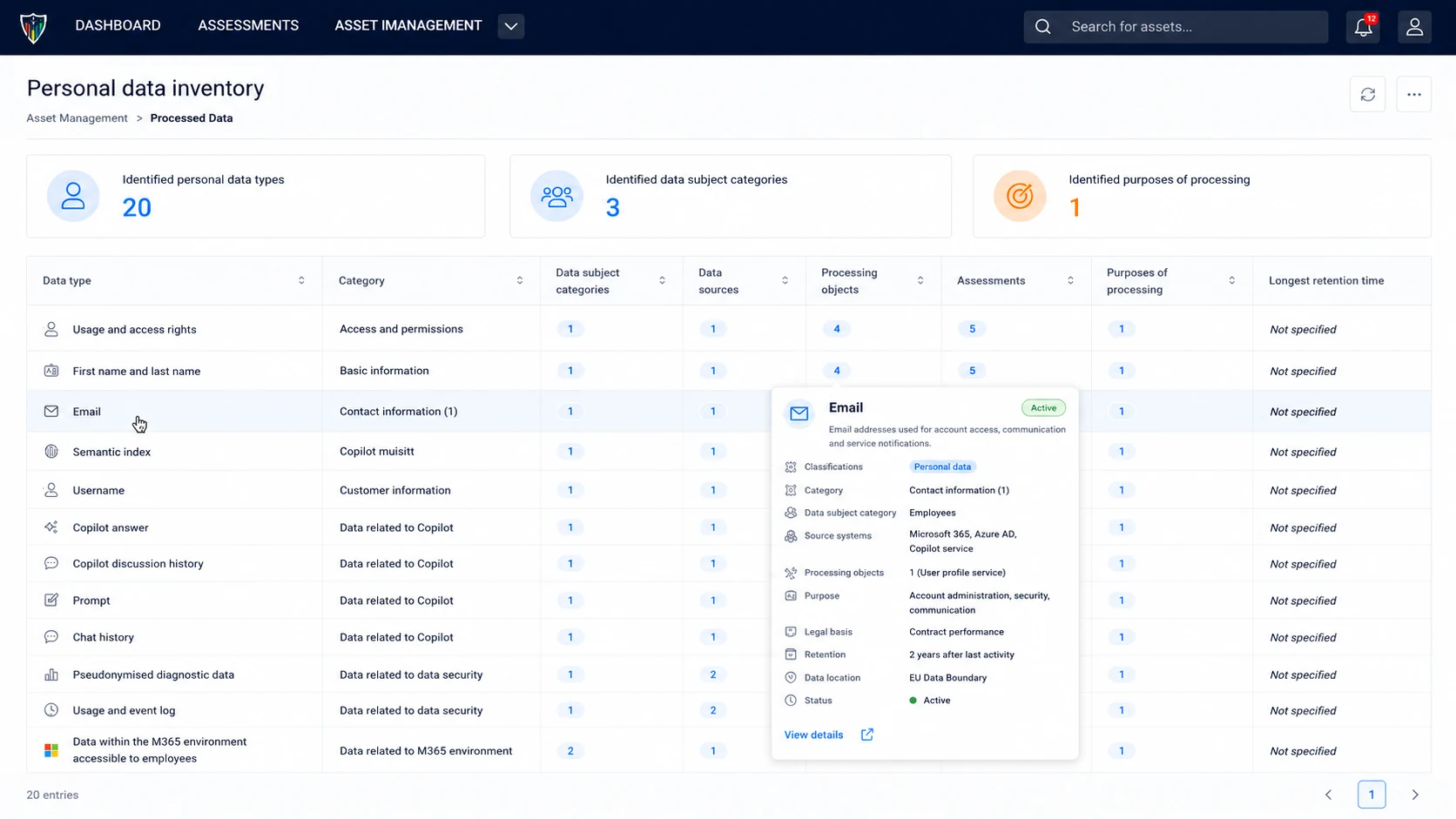
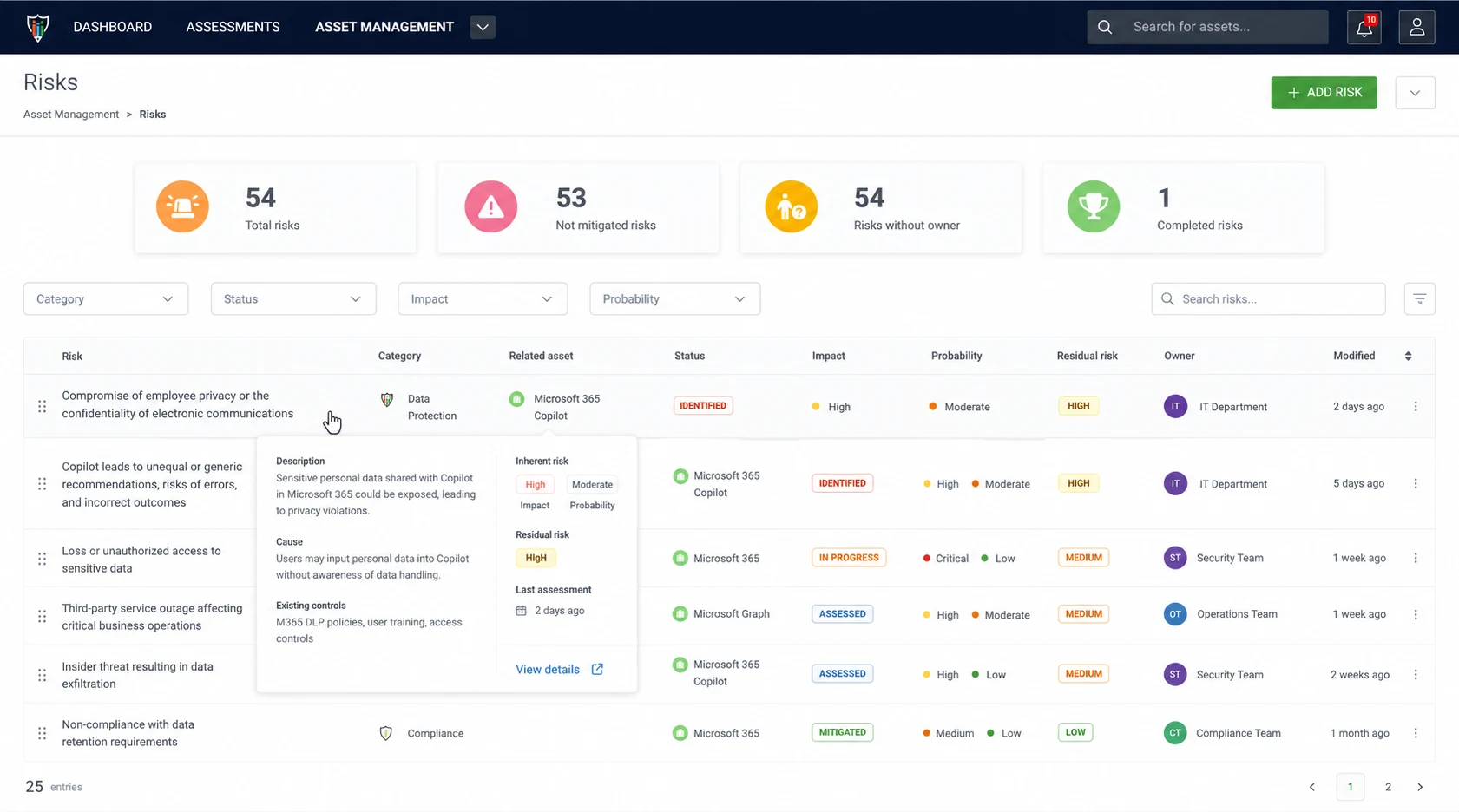
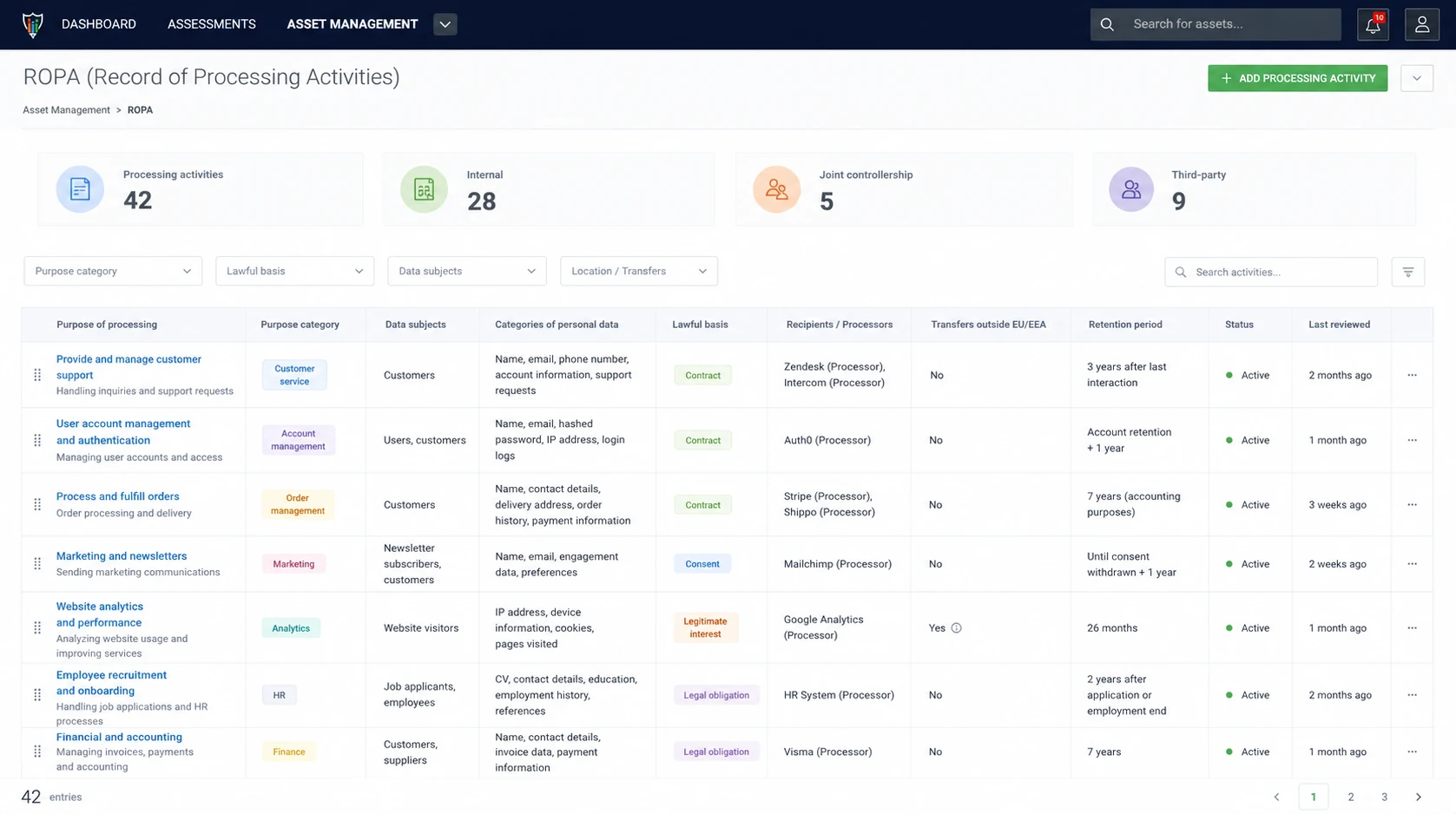
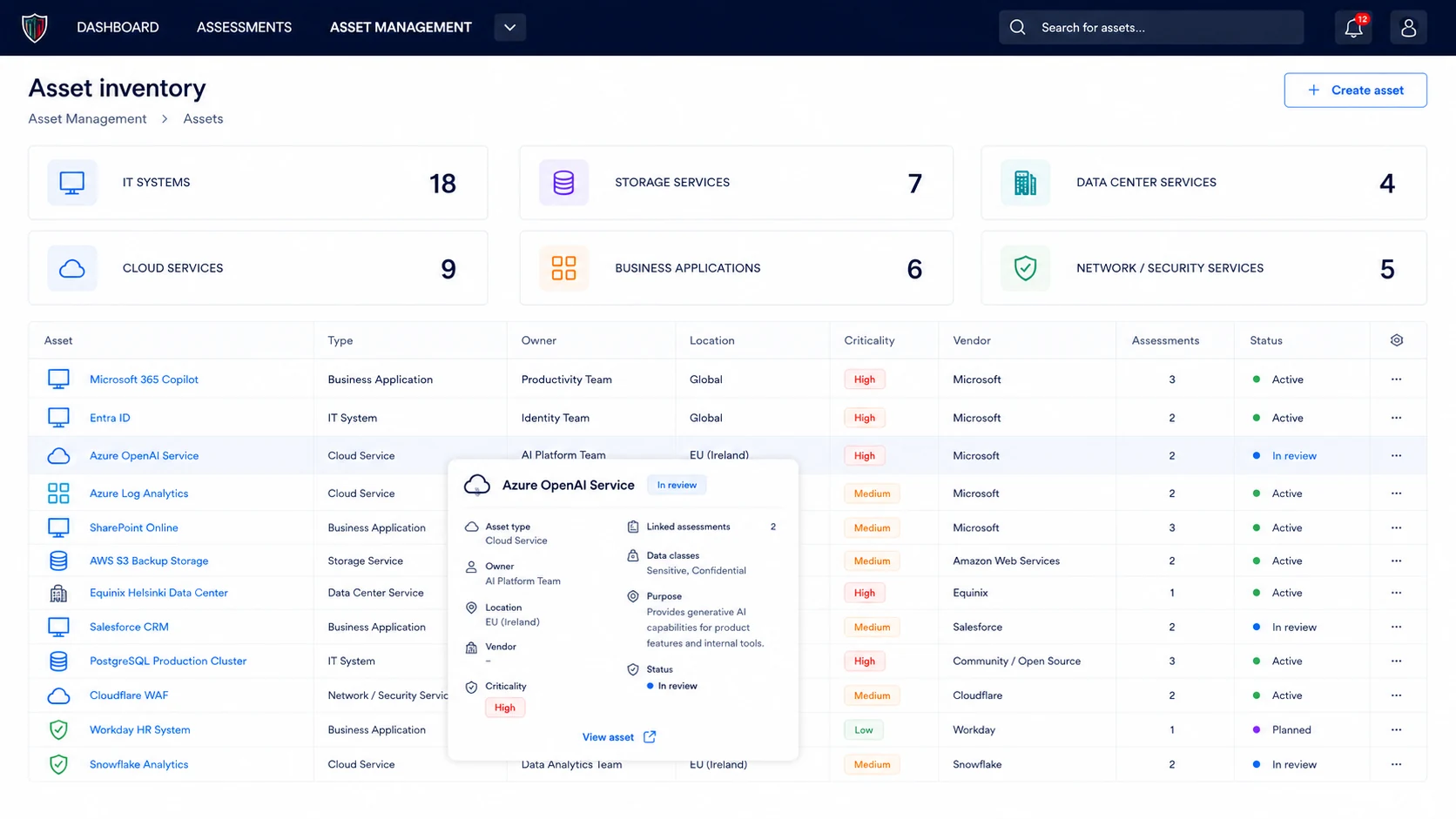
It works with PrivacyDesigner's structured records for processing activities, personal data, systems, vendors, risks and tasks. The information gathered during an assessment becomes part of connected documentation your team can revisit and maintain. These are the modules it writes to, use the tabs or arrows, or drag, to move between them.

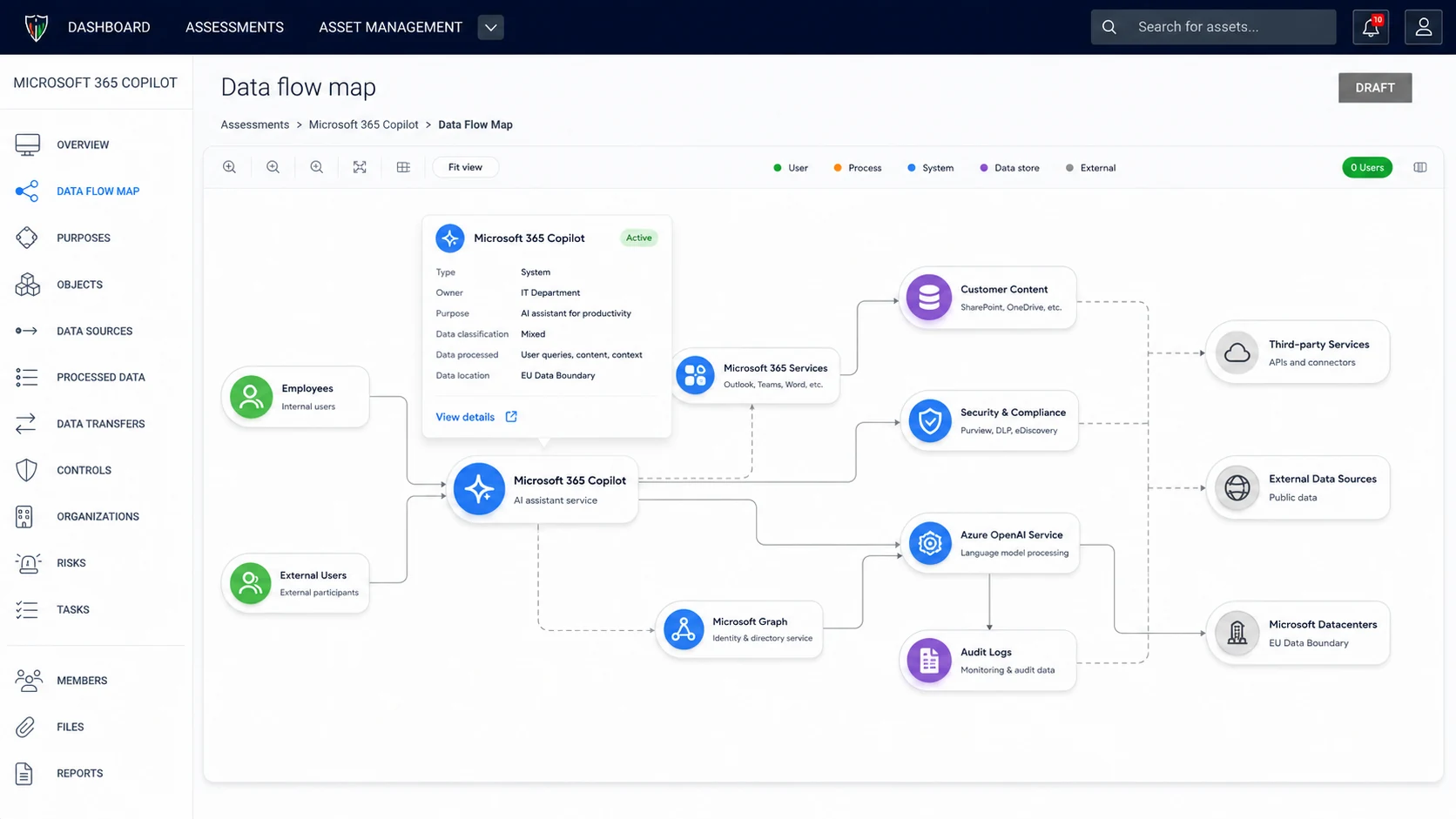
PrivacyDesigner data-flow map: personal data moving between an application, connected services, vendors, and external data centres.
Data-flow map
PrivacyDesigner personal-data inventory: data types, subject categories, and processing purposes captured as structured records.
Personal-data inventory
PrivacyDesigner risk register: identified risks scored by impact, probability, and residual risk, each with a status and owner.
Risk assessments
PrivacyDesigner records of processing activities, with controllers, processors, lawful bases, and third-country transfers as structured records.
Records of processing
PrivacyDesigner asset inventory: IT systems, cloud services, and applications catalogued with type, owner, location, criticality, and vendor.
Asset inventory
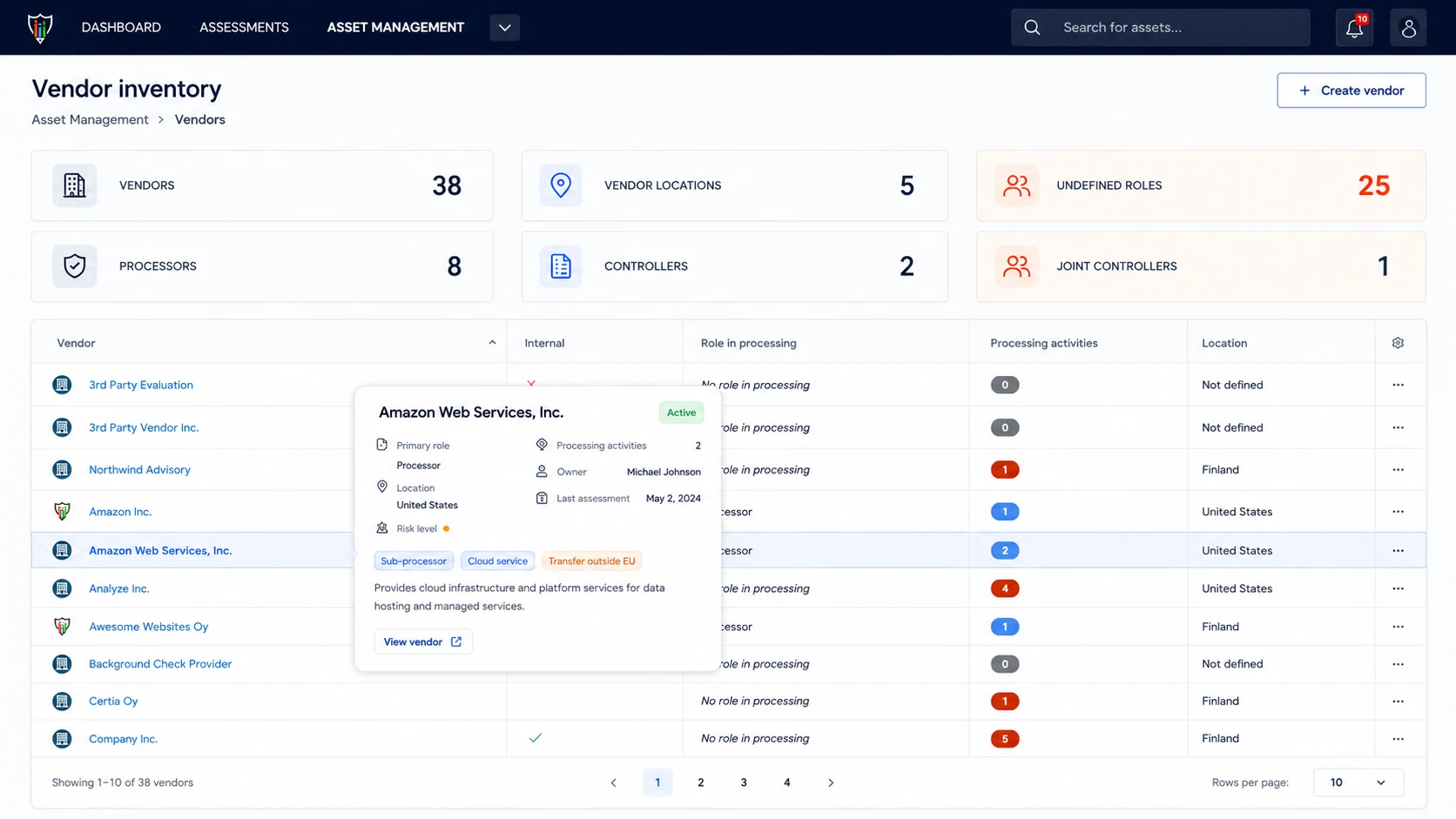
PrivacyDesigner vendor inventory: processors, controllers, and joint controllers with their roles, locations, and processing activities.
Vendor inventory
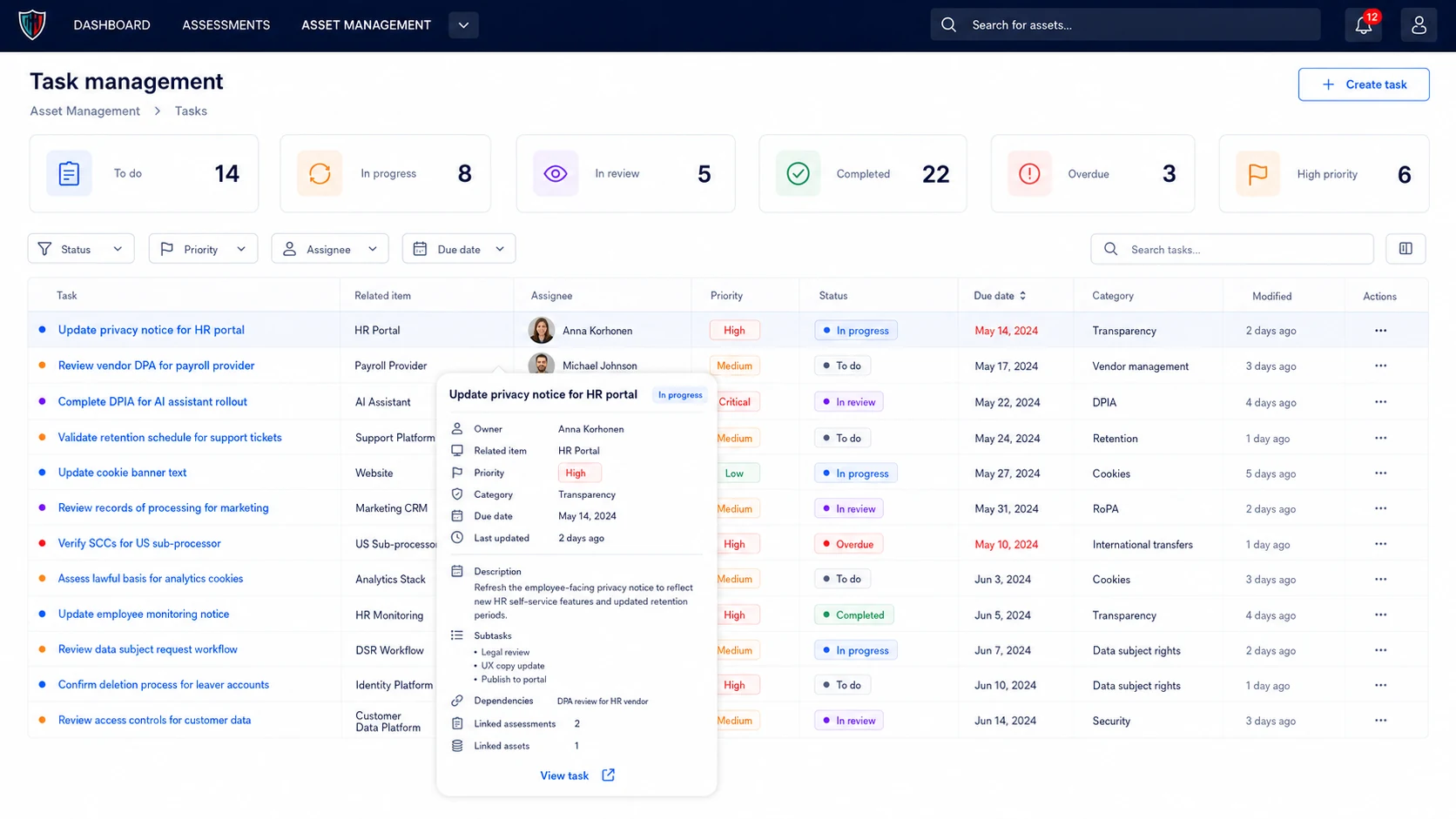
PrivacyDesigner task management: follow-up tasks tracked by status, priority, assignee, and due date.
Task management

06 Experience and frameworks

Built by privacy practitioners. Shaped by real assessment work.

We have spent more than a decade conducting privacy assessments, including PIAs, DPIAs and TIAs. We used that practical experience to build Caijo: how to establish the context, which follow-up questions to ask, and how to turn the findings into useful documentation.

Our ready-made assessment frameworks are built by the lawyers who run those assessments for a living. Your colleagues work through them in plain language, while your privacy professionals review the analysis and recommendations.

Already have your own assessment method? Your experts turn it into controls in PrivacyDesigner, and can combine them with the ready-made frameworks, so one assessment covers privacy, security and AI governance together instead of as three separate exercises.

Explore assessment frameworks

08 FAQ

Before you start, and what happens next.

Can anyone in our organisation start an assessment?
Yes. Colleagues with access can describe the project they know in plain language, without needing to understand privacy law. Caijo is available 24/7, so a privacy specialist does not need to lead every initial conversation. Some details may still need input from IT, procurement, a supplier or another colleague.
How is this different from a general-purpose AI?
A general-purpose AI can ask follow-up questions too. Caijo provides a purpose-built assessment workflow: contextual fact-finding, a selected framework, an initial assessment of risks and measures, and connected documentation in PrivacyDesigner. You do not have to design that process or organise the results yourself.
How long does an assessment take?
The 15–45-minute range refers to the guided conversation and initial assessment, not the entire process of resolving outstanding questions and completing expert review. The time needed depends on the scope and the information available.
What if we do not know an answer?
Say so. Caijo keeps unanswered questions visible for follow-up. You do not need to guess, and your team can get the missing information from the people who know it.
Does Caijo replace our DPO or legal reviewer?
No. Caijo carries out guided fact-finding, assessment and documentation. Your experts check the facts, review the analysis and recommendations, and advise your organisation on the next steps.
Which assessments can we use it for?
Choose a supported assessment framework, such as a GDPR data protection impact assessment (DPIA), or create your own in PrivacyDesigner. The selected framework guides the requirements Caijo examines. Explore the framework catalogue to see the available options.
Is the report the only output?
No. The assessment information contributes to connected records in PrivacyDesigner, including processing activities, personal data, systems, vendors, AI use cases, risks and tasks. Your team can maintain the information alongside the assessment rather than keeping the report as an isolated file.
Can we try Caijo for free?
Yes. Request free test access and bring a use case relevant to your team. We will contact you to arrange access. A demo is optional. Request free test access.

→ Free testing

Bring your project. See the questions and the result.

Try Caijo for free on your own use case. Work through the conversation, explore the risks and recommended measures, and see how the assessment connects to your organisation's documentation.

Try Caijo for free

Use it for your use case. We'll contact you to arrange free access.

Prefer a walkthrough? Request a demo.

Try Caijo for free